When I first started agency work, one of my first real responsibilities was cleaning up hacked sites.
Not occasionally. Regularly. It was just part of the rotation. A client site would get compromised, someone would flag it, and we’d go in and deal with it. Then move on to the next one. The agency had been operating this way for years before I got there, and nobody had stopped to ask whether it had to be that way.
It didn’t.
After 12 years of WordPress development, I now manage over 100 client sites and hacked sites are genuinely rare. Here’s how I got there.
The problem with reacting
When an agency is in reaction mode, it becomes the background noise of the job. You stop seeing it as a problem and start seeing it as normal. A site gets hacked, you clean it up. A plugin update breaks something, you fix it. The client is frustrated, you apologize and move on.
That cycle has a real cost. In time, in client trust, and in the kind of work you actually want to be doing.
The shift I made wasn’t about working faster or getting better at cleanup. It was about building something that made cleanup unnecessary most of the time. Stop reacting. Start preventing.
Controlling the environment
This was the first and most important decision I made.
I host all my clients on Cloudways. Not because I needed another revenue stream, but because I needed to stop fighting bad hosting environments. Slow servers, outdated PHP versions, shared hosts that wouldn’t let me do basic things, clients who couldn’t find their cPanel login. All of that went away when I moved everyone onto infrastructure I control.
My clients don’t want to deal with hosting. They want a website that works. Handling hosting for them is a convenience they appreciate, and it removes an entire category of problems from my plate.
I have a simple rule now. I don’t maintain sites I don’t host. With a few exceptions for long-standing clients I’ve worked with for years, if I can’t control the environment, I can’t be responsible for it. That boundary has saved me more headaches than any tool I’ve ever used.
The maintenance stack
Once the environment was under control, I needed a dashboard to manage everything from one place.
I used ManageWP for almost a decade. It was a solid tool and I had no major complaints at the time. But after GoDaddy acquired them in 2016, things slowly started to drift. The product felt less focused over time.
I eventually moved to WPRemote, which is built by the same team behind BlogVault and MalCare. That connection matters, which I’ll get to in a second.
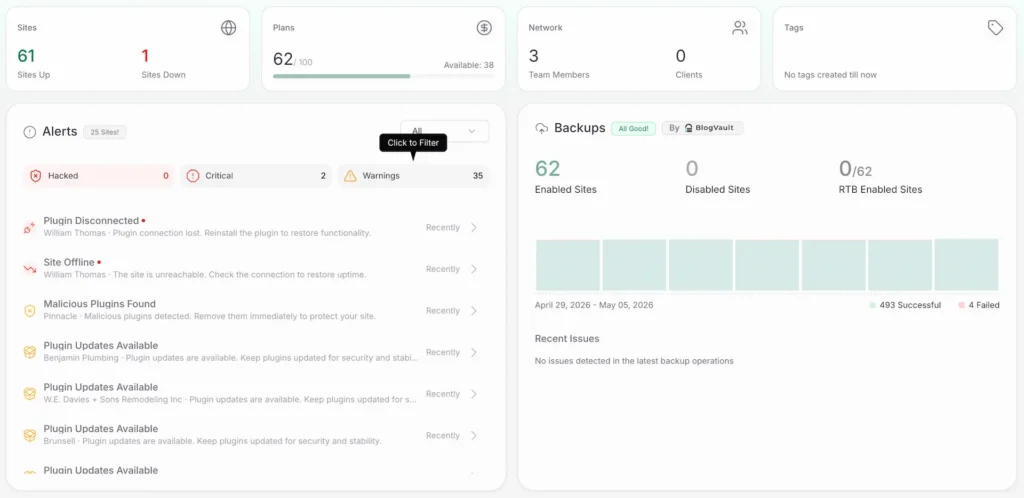
WPRemote handles the core of my maintenance routine from one dashboard. Updates for WordPress core, plugins, and themes across all sites. Daily backups stored offsite. Uptime monitoring that pings sites multiple times a day. Activity logs so I can see exactly what changed and when. And a staging environment for testing updates before they touch a live site.
The piece I rely on most is automated update schedules with visual regression testing. Before I had this, running daily updates across 100+ sites manually wasn’t just tedious, it was impossible. Something would inevitably get missed.
Now WPRemote runs updates on a schedule and compares screenshots of the site before and after each one. If something looks different, it rolls the update back automatically and sends me a Slack notification to go take a look. I’m not babysitting every update. I’m only pulled in when something actually needs my attention.
That’s the only way daily updates at this scale are even realistic.
Security without the extra layer
This is where the Cloudways and WPRemote combination really pays off.
Cloudways has a native integration with MalCare, which is a security plugin built by BlogVault, the same company behind WPRemote. Because of that integration, MalCare is already baked into my hosting environment. That means I don’t need to run Wordfence on top of everything else.
For years, Wordfence was just part of my standard install. It works, but it adds weight to every site and it’s one more thing to configure and monitor. Replacing it with MalCare through the Cloudways integration simplified my stack and actually improved my coverage. MalCare includes a firewall, automated malware scanning, and brute force protection at the login page.
One less plugin. One less configuration. One less thing to break.
The part the dashboard doesn’t handle
Tools only go so far. The other half of running a stable maintenance operation is what happens before a site ever gets into the dashboard.
I build all my themes in-house using FSE (Full Site Editing), WordPress’s block-based theme system. That means I know exactly what’s in every theme I’m maintaining. No mystery code from a theme I didn’t write, no bloated page builder framework underneath everything.
Plugins get vetted before they go on a client site. I look at update frequency, the developer’s track record, active install count, and support responsiveness. A plugin that hasn’t been updated in two years doesn’t make it onto my sites. This matters more than most developers realize. A significant portion of WordPress hacks and site breakages come from abandoned or poorly maintained plugins.
Keeping a tight, known plugin set across my client sites means fewer conflicts, fewer surprises after updates, and less time spent debugging things I didn’t install.
What changed after
Almost immediately after putting this system in place, the reactive support requests dropped off.
Hacked sites became rare. Update-related breakages became rare. The frantic “my site is down” emails mostly stopped. When something does go wrong, I usually know about it before the client does because the monitoring caught it first.
That’s the actual goal. Not to be a faster firefighter. To have fewer fires.
It took me longer than it should have to build this. Partly because the reactive mode felt normal, and partly because building infrastructure takes time you don’t feel like you have when you’re always putting out fires. But the compounding return on getting it right is significant.
If you’re managing more than a handful of client sites and still operating without a maintenance system, the chaos you’re living in isn’t inevitable. It’s just a problem you haven’t solved yet.